
A focus app for iPhone · 90:00+
Added Time for iPhone — Bank the hours you promised yourself.
A study timer for an exam, a degree, a craft. Pause, and the minutes are added back on.
Free to download Your record · free forever No account No ads · no tracking in the app
Not on your iPhone right now? Try the free focus and study timer in your browser.
What it does
How it tracks your hours, plainly.
You name the hours you owe yourself. It times them honestly, writes them down, and — if you want — keeps other apps out of the way.
-
01
Name the hours you owe yourself
Anything you're working toward, and what it asks: hours a day, hours a week, or a habit on certain days. Daily goals draw as empty slots each morning; a weekly goal keeps its slots on the Week, because it has no deadline today.
LSAT · 3h a day Paragliding · 5h a week Piano · Tue Thu Sat
-
02
Sit down and start a block
Tap it, pick a length — 30, 60, 90, 120 minutes — and the clock takes the screen, counting up. Apps you've named step aside while you work, and the whistle lifts them with you.
Screen Time access is asked for only when you first set apps aside — never for the clock or the record. The clock, the Week and the Record work without it.
-
03
Interrupted? Hit the whistle
One tap holds the clock; a second clock counts the pause in orange. Those minutes weren't going toward the goal, so they're added to the end. Tap again to carry on.
-
04
The time lands as ink
A slash is thirty minutes, a cross is sixty. They draw themselves onto today's page as you earn them, and ending early keeps every minute.
-
05
The Week is the plan and the record
Forward is next week, empty — the plan. Back is last week, inked — hours banked, habits kept, and with Plus the nights your quiet hours held. At the foot of the plan, a door to the Record: every week you've ever kept.
-
06
Optionally: quiet the phone on a schedule
Standing windows hide the apps you name — quiet hours at 8:30, deep work at 11 — even with Added Time closed. One window is free forever; the full week is Plus.
That's the loop. Everything it records is free, forever — the scheduled hiding is the subscription.
The whistle
A focus timer where the pause is priced, never punished.
Get up, drift, get interrupted — hit the whistle. The main clock freezes and a second clock starts. Tap again and you're back in play. Every other timer treats a pause as free; Added Time treats it as what it is — time that gets added on.
Named after stoppage time — the minutes added back after the game stops.
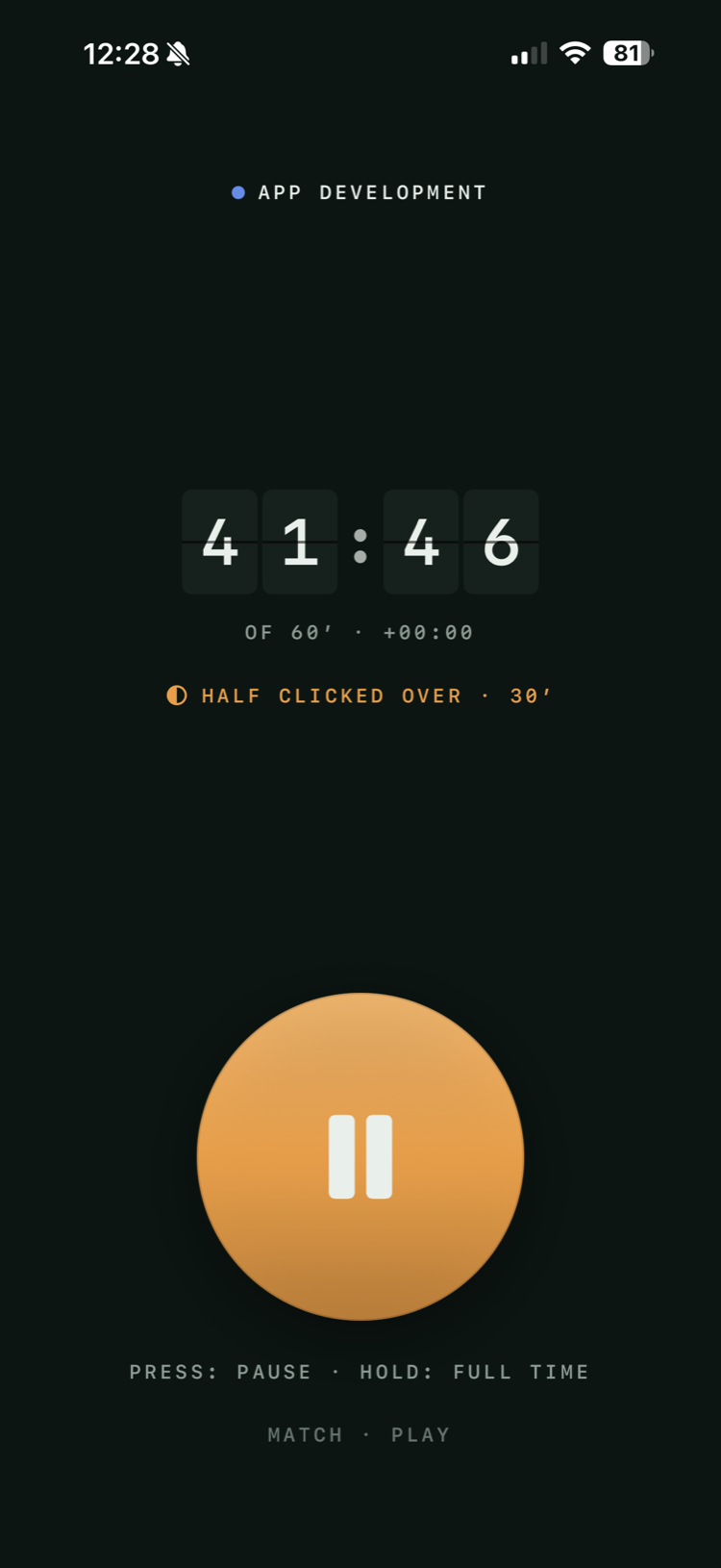
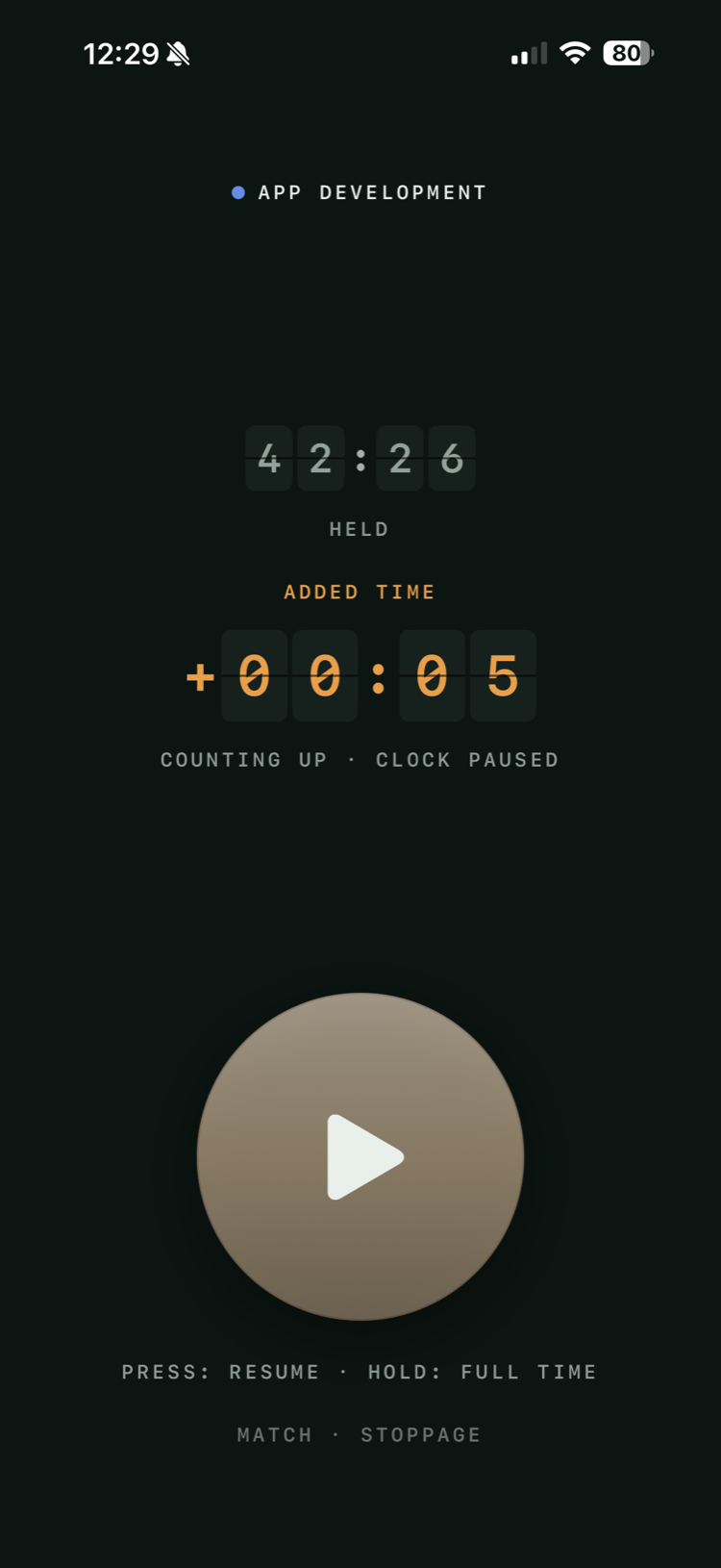
The clock never judges. It just refuses to lie.
42:26 played +00:05 added
One tap, never categorised — no “why did you stop?” prompt. The pause comes back because the goal only counts the minutes it actually got. Full time is a milestone, not a wall: play rolls on, and counts, for up to four more hours. Four hours also bounds a pause — the app trusts an unattended clock that long, paused or playing, then settles it for you with every mark kept.
Want to feel it before you download anything? The free focus & study timer runs the same match clock in your browser: it holds on the whistle, adds the pause on, and inks every half hour.
Today
The page you keep
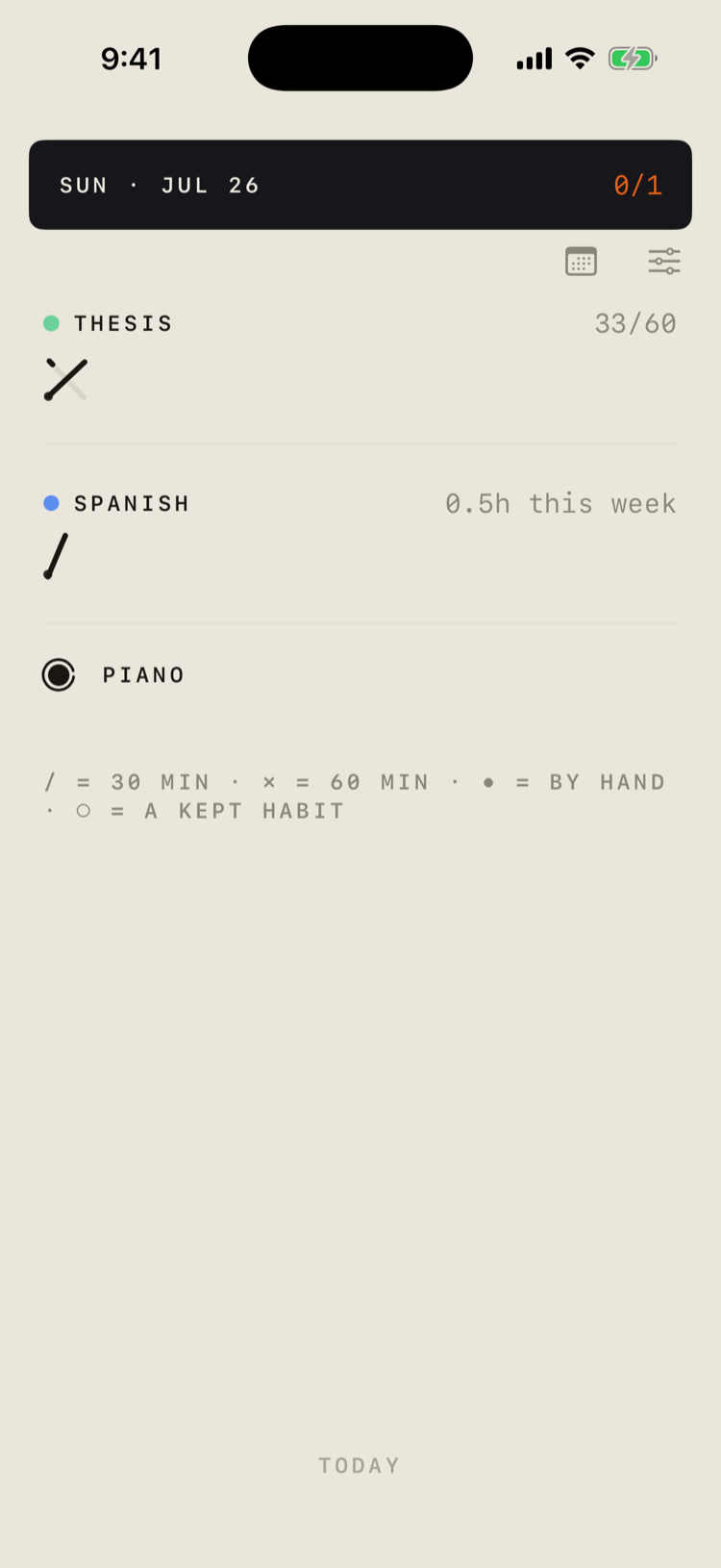
Today is the notebook page. A daily goal draws its marks against empty slots; a weekly goal draws marks with no slots, because nothing about it can fall behind on a Tuesday; a habit is one ring, ticked or not.
Nothing is discarded. Stop at 33 minutes of 60 and you bank a full mark plus a part-drawn one — two parts join into a whole. Time you worked but never timed can be added by hand.
Thesis · 33 / 60 / = 30 min · ✗ = 60 min · • = by hand
Your focus ratio — focused time over focused plus paused, counting only what the clock witnessed, so hand-added hours sit it out.
History keeps streaks beside it: an active day for any mark banked, a clean sheet for a day every daily goal was met. Nothing pushes you about them, and when one ends the app says nothing at all.
The week
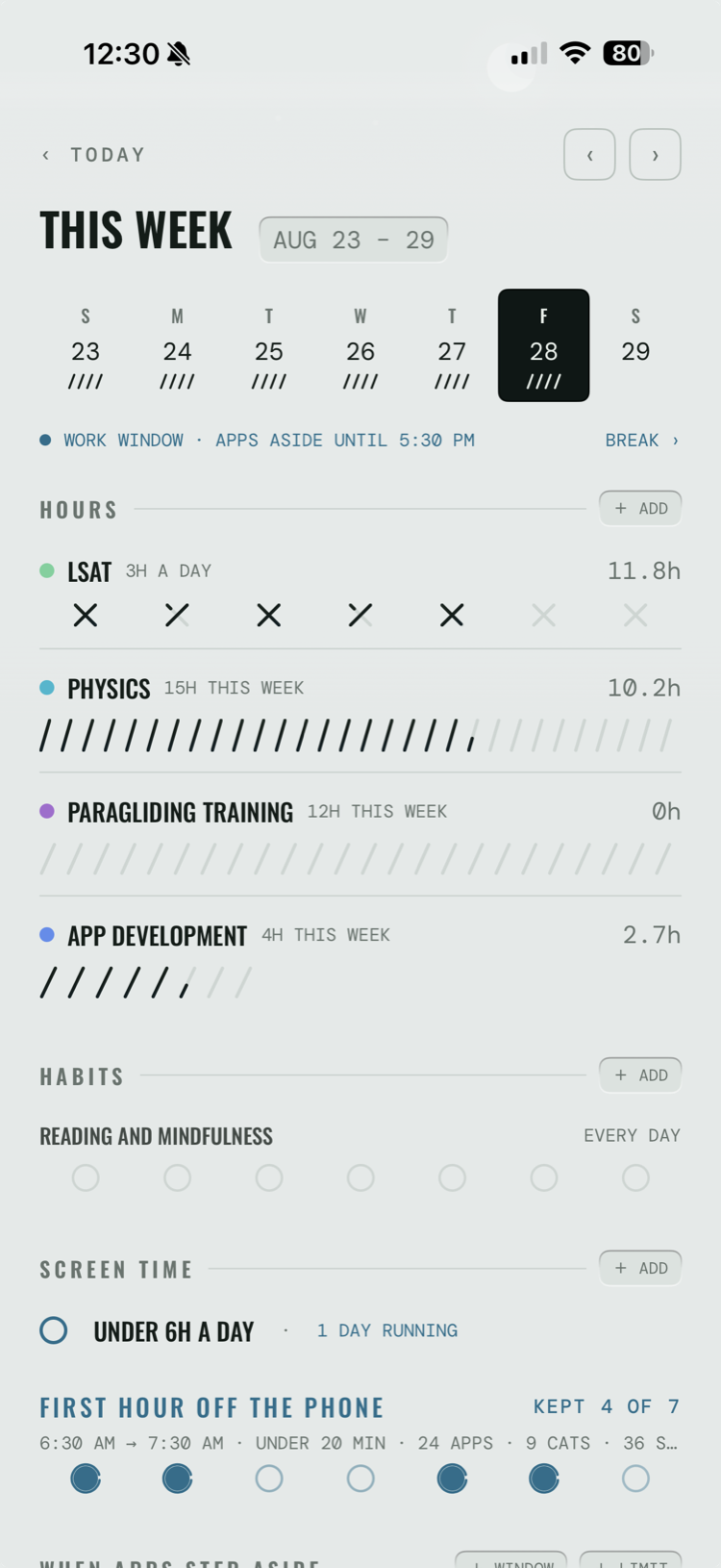
Your week: the study plan and the record, on one page.
One seven-day spine. Page forward for the plan, back for what actually happened — same page, now in ink. That's the weekly review, and you don't have to run it.
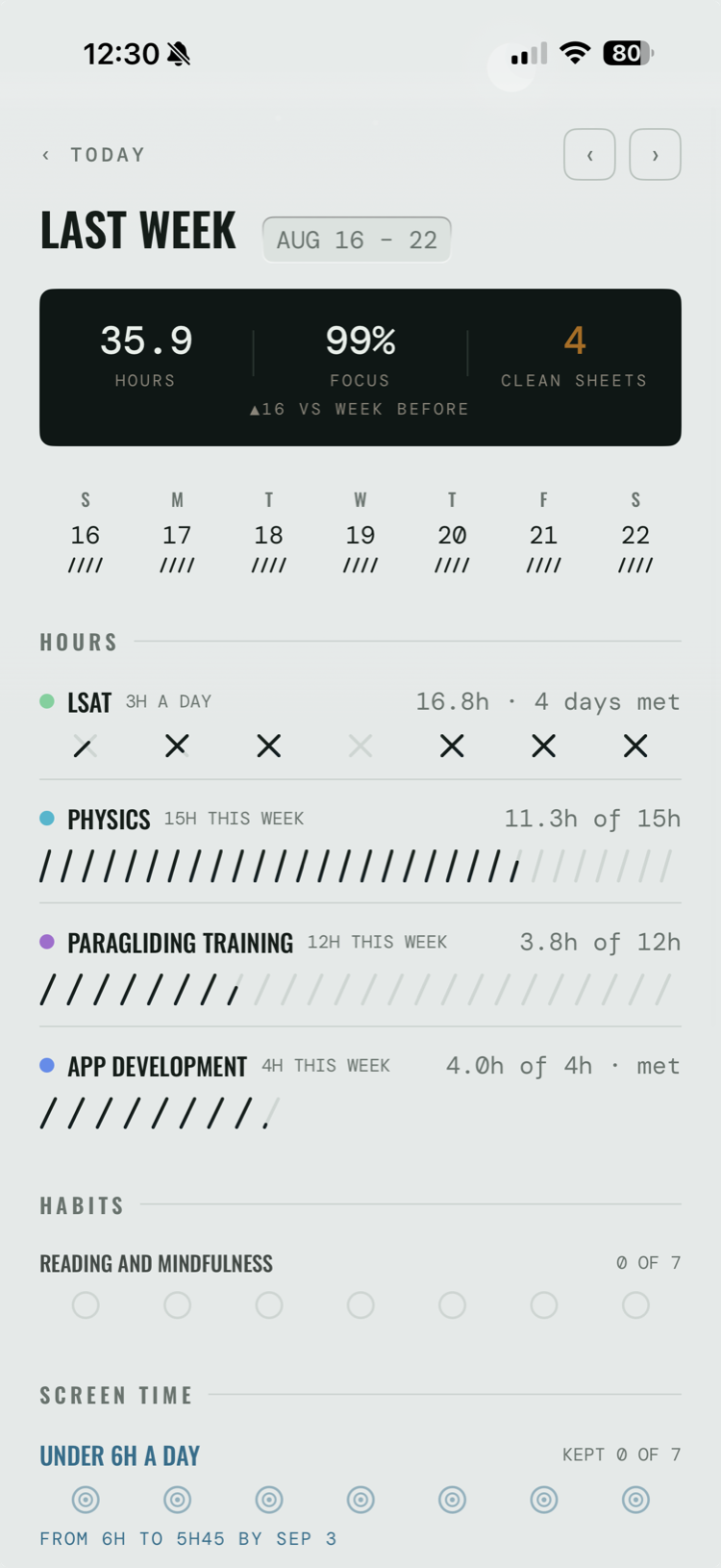
Three kinds of claim
A subject asks for hours per day, hours per week, or just a habit — did I do it, on the days it applies.
A habit can't go stale
Habits appear only on the weekdays they apply to, and they're gone at midnight either way. One you didn't get to stays exactly the faint ghost it was that morning — nothing changes colour.
The review is free
Paging back is the weekly review — no report to generate, no summary email, nothing to subscribe to.
Time away costs nothing
At midnight today's page starts clean — no backlog, nothing owed. Come back after a week away and the app simply opens on today.
The record
Did I put the hours in?
One page answers it — this week, this month, or every hour since your first block. Nothing to generate. You already wrote it.
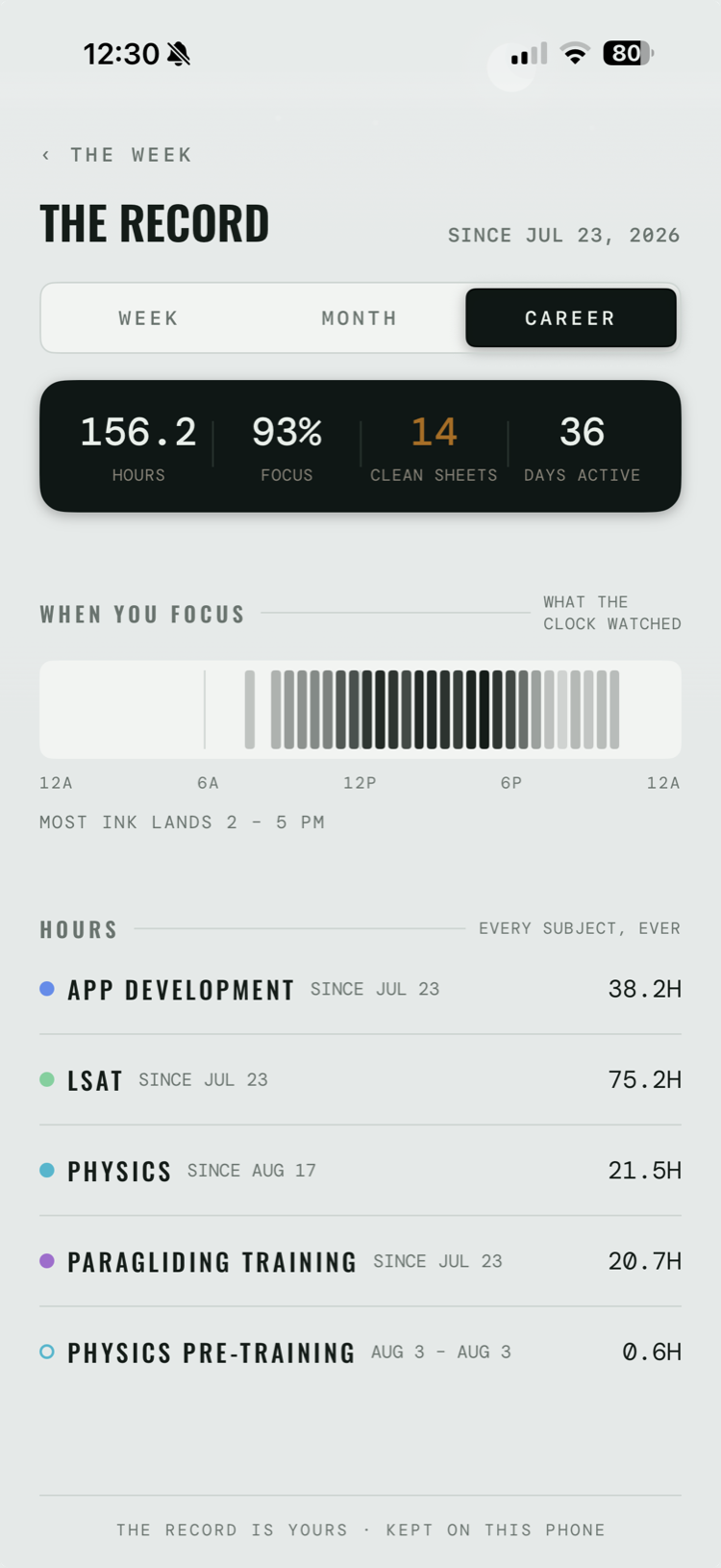
Four figures, all of them things you did. Where there's nothing to state, it draws a dash rather than a zero.
Hours
Every minute you banked, in tenths — hand-added hours included.
Focus
Today's ratio, across the whole range. Hand-added hours count in the total above, never in this one.
Clean sheets
Days when everything asking for hours that day got them. Weekly goals and habits don't count; an archived subject stops asking.
Days active
Days you did something — a total, never a run. No streak to break here, so a Tuesday off costs you nothing.
And when your hours land. A quiet band shows the times of day you actually work — most ink lands 2 – 5 PM, or whenever yours does. It shows only what the clock watched, and says so. No map of your gaps.
Below that, one line per subject, most recent on top — never ranked by size — each with the dates it ran. Finish something and it keeps its line, its hours and its colour; only the dates close.
Week Month Career · since your first block
The payoff screen isn't the paid one — the Record is free on every tier. It opens from the foot of the week's plan and from a card in History, and its own last line is the whole promise: the record is yours · kept on this phone.
Every hour since your first block, free: Added Time on the App Store ›
The doorman
Apps step aside while you study, and on schedule.
Two ways. During a block, the apps you named step aside until the whistle. On a standing window — quiet hours, deep work, a wind-down — they step aside on the clock, whether or not the app is open.
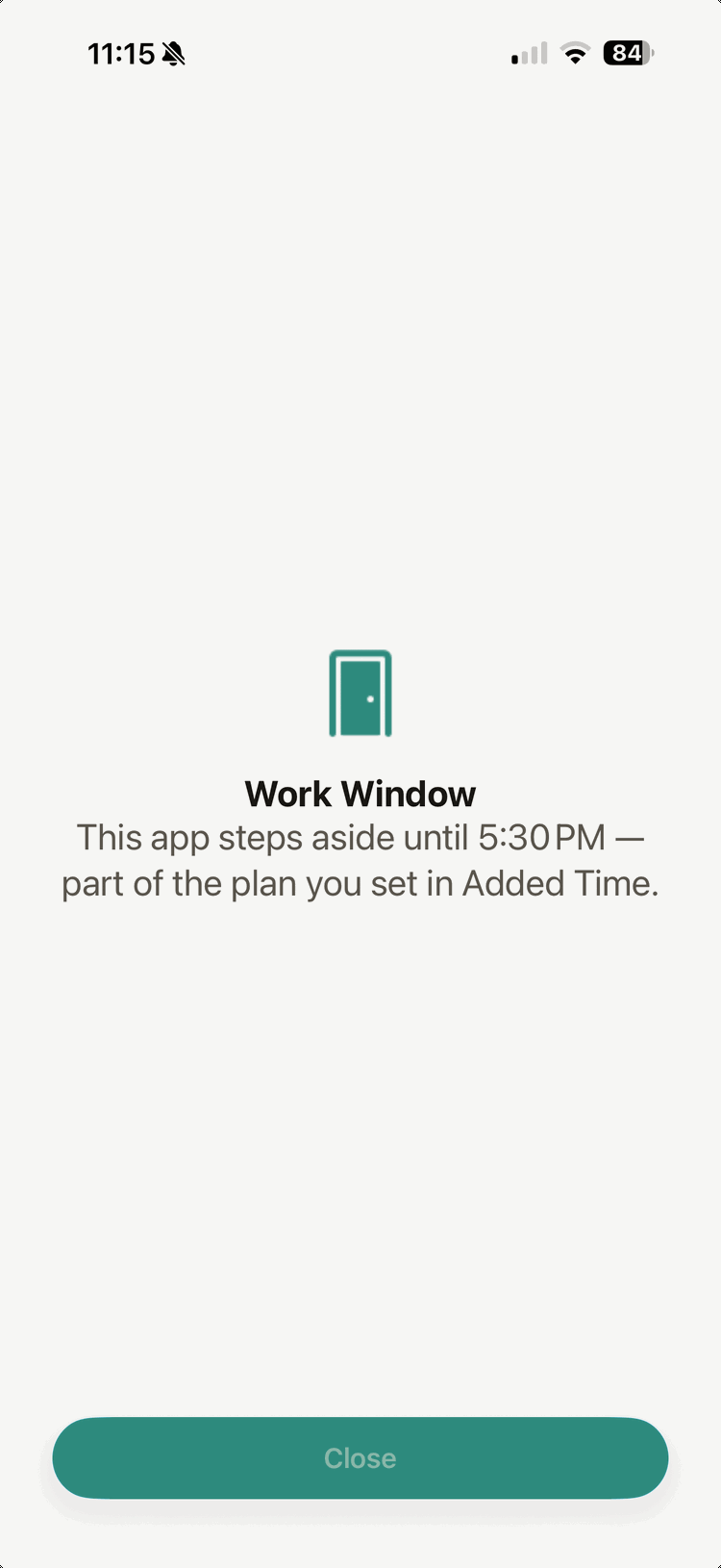
A window hides apps. It doesn't start a focus block for you — starting is always your call.
Open an app a window has set aside and the window says so itself — which arrangement it is, and when it lifts. No countdown, no lecture.
Work Window Steps aside until 5:30 PM
And the doors keep their handles. A break lifts a shield for fifteen minutes and re-arms itself. A five-second hold skips one night. The emergency exit in Settings lifts them all at once, each re-arming at its next turn — what you asked to hold stays held. A running block is never touched.
Quiet hours Held 6 of 7 nights 2 breaks
That's the doorman's ledger, on the Week paged back, with Plus: nights kept and honest exits taken — never a count of what it stopped. Breaks and the emergency exit are free on every tier; a paywalled exit is the one thing this app won't build.
Also in the box
The small machinery.
Live Activity & Dynamic Island
The clock on your lock screen, with a working whistle — you never unlock the phone to stop it.
“Hey Siri, start a block in Added Time”
Siri asks which subject and how long. A saved Shortcut or the Action Button can have both answers already filled in.
Running start
Forgot to hit go? Backdate the start by up to twenty minutes. Past that, add it by hand — the clock counts real work and never inflates it.
Hours the clock never saw
An hour in the air, a rehearsal, a library afternoon with the phone in a bag — add it by hand. Same ink, with a small dot to say the clock wasn't there.
Screen-time dashboard
Your own usage, in the app's style — drawn inside a sealed view iOS keeps to itself. The app never reads the minutes, and neither do we.
Screen-time goals Plus
A daily budget for the apps eating your hours. Days under it build a streak, and after a clean week the app offers one notch down — stopping where you said. Up to three goals, and one can be a quiet morning: the first hour off the phone, kept as a fact.
Daily limits Plus
One cap across the apps you pick, not a clock. When they’ve had their day, they step aside until tomorrow — and a break lifts them like anything else.
Six kits, two always free
The whole app can change its look. Analog and High Contrast are free forever; Midnight, Almanac, Forest and Altitude come with Plus. The legibility kit is never paid — readability isn't for sale.
Why this exists
Built to keep a promise.
I built this to hold myself to hours I'd promised myself — the LSAT, problem sets for my physics degree, and a weekly count of hours in the air. I didn't need another app to tell me my screen time was bad. I needed those hours to actually happen.
That's why the clock pauses the way it does, and why the record only counts what you kept. The motivation is watching the ink add up, never being scolded about the gaps.
If you have hours you owe yourself — an exam, a degree, an instrument, a language, a sport, hours in the air — this was built for you.
— Mathias B Jacobson, who made Added Time
How many hours the LSAT takes, by the prep companies' own numbers
From the beta
In their words.
Placeholder — quotes pending permission
Three short, real beta-tester quotes go here; the markup is ready in the page source. This note ships nowhere — replace it before hosting.
Private by design
Privacy isn't a setting. It's the architecture.
We run no servers, so there's nowhere for your record to reach us. It lives on your phone and, from version 1.0.1, when iCloud is on, a copy lives in your own iCloud so it can come back if you delete the app. We can't see either.
Nothing comes to us
No uploads to us, ever. Your record lives on your phone and, from version 1.0.1, when iCloud is on, a copy lives in your own iCloud. We can't see either, and you can switch the copy off.
No account, ever
No sign-up, no email, no profile. Open the app and start.
No tracking, no ads
Zero analytics and zero third-party SDKs. Nobody is watching you work.
Screen Time, locally
Apps step aside through Apple's on-device Screen Time APIs. We never see which apps you use.
Pricing
The ledger is yours, free, forever.
The doorman is Plus.
Everything that records what you did is free, permanently. What costs money is the part that works on the days you never open the app.
Always free
The ledger
$0
- Every subject, goal and habit — no caps
- The clock, the whistle, extra time, running start, add by hand
- Today · the Week, both directions · History · streaks · focus ratio
- The Record — this week, this month, every hour since your first block
- Live Activity, Dynamic Island, Siri and Shortcuts
- Apps step aside during a block
- One standing window, kept forever
- Breaks and the emergency exit, always
- The screen-time dashboard
- Export the whole record to a spreadsheet
Not a trial, not a teaser. Say no to Plus and the paywall closes and doesn't come back asking.
Added Time Plus
The doorman
$29.99/year
- Unlimited standing windows — the whole week
- Daily limits — one cap across the apps you pick, not a clock
- Screen-time goals with step-down coaching — up to three, including quiet mornings
- The doorman's ledger — what it held, on the record
Family Sharing is on for every product.
Monthly
$4.99/mo
Renews monthly. Cancel any time.
Yearly
$29.99/yr
7-day free trial. About $2.50 a month.
Lifetime
$79.99
One payment. Not a subscription — it never renews.
Free to download. You can decide about Plus later.
How it works. Monthly and yearly renew until you cancel, in Settings → your name → Subscriptions, at least 24 hours before the period ends. Apple handles every payment and refund; we never see your card, and there's no account to close.
If Plus lapses, nothing is deleted. Extra windows, limits and screen-time goals stop enforcing and sit in the Week as resting rows — resubscribe and they pick up where they were. Your subjects, tallies, streaks and history are untouched either way; the doorman's ledger lines go quiet with Plus, and the nights come back when you do.
Full billing terms are in the Terms of Service. Prices are in US dollars and may differ by region — the App Store shows your local price before you buy.
Comparing? We wrote an honest Opal alternative comparison, Opal's strengths included. And one with Forest: Added Time vs Forest.
Common questions
Added Time questions, answered.
Is the free tier really free forever?
Yes. Every subject, goal and habit, the clock and whistle, the Week, the Record, History, streaks, one standing window — uncapped, permanently. Not a trial: nothing you have today gets taken away.
Do apps stay hidden when Added Time is closed?
Yes — iOS enforces standing windows on the schedule you set, whether or not you open the app. One window is free forever; the full week is Plus.
What happens if I stop paying for Plus?
Nothing is deleted, ever. Extra windows, limits and screen-time goals simply rest — visible in the Week, not running — and pick up where they were if you return. Your subjects, tallies, streaks and history are untouched; the doorman's ledger lines go quiet with Plus, and the nights come back when you do.
Is there a lifetime option?
Yes: Added Time Plus for $79.99, one payment. It's not a subscription and never renews, and Family Sharing is on. Plus is also $4.99 a month, or $29.99 a year after a 7-day free trial.
Can Added Time see what I do on my phone?
No. Apple's Screen Time framework hands the app opaque tokens — it can't read which apps you picked — and nothing about you is ever sent to us. There's no account and no analytics to send it to.
Do I have to give Screen Time access?
Only for the parts that work with other apps: setting them aside during a block or on a schedule, daily limits, screen-time goals and the screen-time dashboard. It's asked for the first time you pick apps, never for the clock or the record, and the clock, Today, the Week and the Record all work without it. Apple's Screen Time framework hands the app opaque tokens, so it can't read which apps you picked.
Is Added Time only for studying?
No — it's for any hours you owe yourself: an exam, a degree, an instrument, a language, a sport, a craft. If it can ask for hours a day, hours a week, or a habit on certain days, Added Time can hold you to it. Hours the clock never saw — a flight, a rehearsal — can be added by hand.
How do I track my study hours?
Give each subject what it asks of you (hours a day, hours a week, or a habit on certain days) and start the clock. Every half hour lands as ink on today's page, and the Record keeps this week, this month and every hour since your first block. Hours the clock never saw can be added by hand. All of it is free. On a laptop, the free focus & study timer inks your hours in the browser.
Does it work on iPad, Android or a computer?
Added Time is made for iPhone, on iOS 18 or later. Apple also offers it on Macs with Apple silicon, but it isn't made or tested for them. Anywhere else, the free focus & study timer runs the same match clock in your browser.
More in Support.
Turn focus into added time.
Quiet, private, and yours. Give the hours you owe yourself somewhere to land.
Free to download. Added Time Plus is optional.